Documents & Files
NextGen lets you upload, browse, and manage documents across the platform. Attach files to tickets, tasks, and contacts, or manage company-wide documents through the document management module.
Attaching Files to Tickets & Tasks
You can attach files to any ticket, task, or contact. Supported formats include:
| Format | Types |
|---|---|
| Documents | PDF, Word (.docx), Excel (.xlsx), PowerPoint (.pptx) |
| Images | PNG, JPG, GIF, SVG |
| Archives | ZIP files |
| Other | Text files, CSV, and more |
How to Upload
Open the item
Click Attach or drag and drop
Wait for upload
Previewing Files
Click on any attached file to preview it directly in the browser — no need to download first. NextGen supports inline preview for:
- PDF files — Full document viewer with page navigation
- Images — View with zoom and rotation
- Word documents — Rendered preview of .docx files
- PowerPoint — Slide-by-slide preview
- Excel — Spreadsheet preview with sheets
Downloading Files
Click the Download button on any file to save it to your computer. You can also print files directly from the preview.
Company Policy Documents
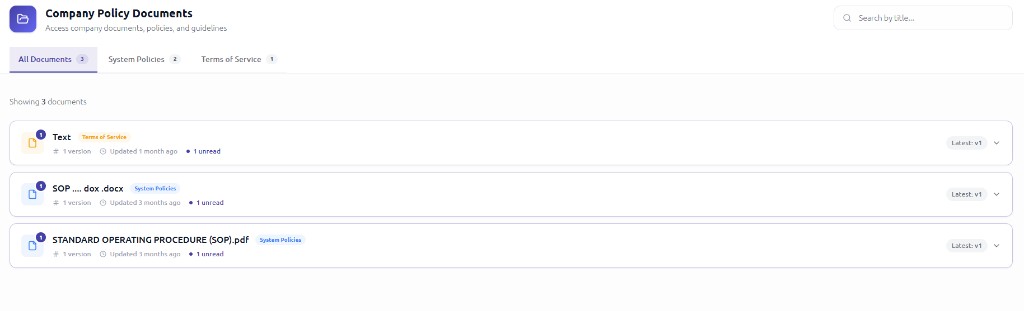
Go to Policy Docs in the sidebar to access company-wide documents. The Company Policy Documents page lets you access company documents, policies, and guidelines shared across your organization.
Policy Documents Interface
The interface includes:
- Search — Use the search bar to find documents by title
- Filter tabs — Switch between All Documents, System Policies, Terms of Service, or other categories
- Document list — Each document shows its title, category tag, version count, last updated date, and unread status
- Version selector — Use the version dropdown (e.g., Latest: v1) to view different versions of a document
Common document types include:
- Company policies
- Standard operating procedures (SOPs)
- Terms of Service
- Training materials
- Compliance documents
Document Types
Administrators can create document types to categorize files:
- Contracts
- Invoices
- Reports
- Policies
- Custom types
File Sync (Admin)
Administrators can configure automatic file synchronization with an external SFTP server. This keeps company documents in sync between NextGen and your file storage system.